Building DuoCreator — Part 9: Storing Video Projects Without Putting Movies in SwiftData
Why DuoCreator keeps SwiftData for lightweight metadata while real .mov takes live in an ordinary Documents/Projects/Takes folder structure on disk.

Video apps create large data quickly.
That sounds obvious, but it has architectural consequences. A database is a good place for project titles, settings, timestamps and references. It is not where I want multi-hundred-megabyte movie blobs living by default.
DuoCreator keeps those concerns separate.
SwiftData for metadata
The app uses SwiftData for small structured records: creator projects, take metadata and configuration information.
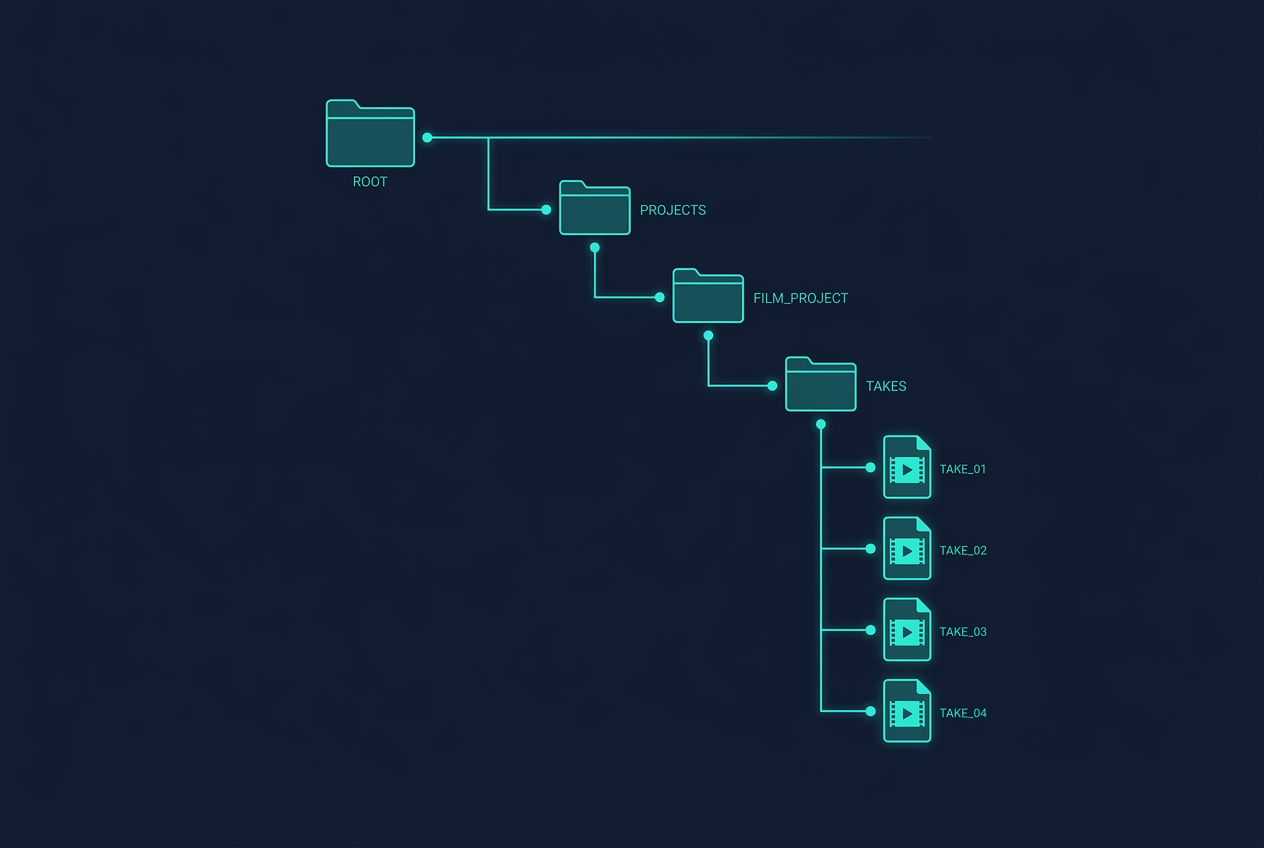
The actual .mov files live under the app's Documents directory.
The current project structure is conceptually:
Documents/
  Projects/
    <project-id>/
      Takes/
        <take-id>.mov
SwiftData stores the relative path.
That makes the relationship explicit without forcing the database to become a media container.
Temporary first, permanent after success
The camera engine records each take to a unique temporary URL.
When AVFoundation reports a successful completion, ProjectMediaStore creates the project's Takes directory if necessary and moves the file into its permanent destination.
A reduced version looks like:
let relative = "Projects/<project>/Takes/<take>.mov"
let destination = documents.appending(path: relative)
try FileManager.default.moveItem(
    at: temporaryURL,
    to: destination
)
The real implementation also handles an existing destination and reads the resulting file size.
This boundary helps avoid creating database records that point to recordings which never completed correctly.
Relative paths instead of absolute paths
Persisting relative paths keeps project metadata tied to the app's own storage structure rather than hard-coding a full sandbox path.
The media store is responsible for turning that relative path into a usable URL.
Small decision, cleaner ownership.
Storage is a recording feature
Available capacity is checked through the file system.
If storage is dangerously low, DuoCreator can refuse to begin a recording and show a useful error.
I prefer that to allowing a creator to begin a take that the app already knows is likely to fail.
Storage warnings are not glamorous UI, but for a recording app they are part of the core experience.
Saving to Photos is explicit
A take can also be exported to the user's Photos library.
The media store requests add-only Photos authorization and creates the asset from the video URL.
Again, the project file and the Photos copy are separate concepts. Deleting a DuoCreator project should not imply mysterious behavior in the user's photo library.
Deletion has clear ownership
Delete a take: remove its file.
Delete an entire project: remove the project's media directory.
That simple ownership model is another advantage of predictable on-disk structure.
It also makes future maintenance easier. If I add thumbnails, proxies or exports, they can live under the same project boundary without changing what SwiftData is for.
CloudKit is deliberately not part of this version
The architecture document explicitly says SwiftData is local-only and CloudKit is disabled.
That is not because cloud sync is impossible. It is because video synchronization is a product of its own: quotas, network conditions, conflict behavior, background transfer and user expectations all need design.
I would rather have an honest local media model than accidentally imply that huge recording files are "synced" because a metadata database supports cloud features.
Foldable hardware does not change storage
This article is also a reminder that not every part of an iPhone Duo app should be about the hinge.
The new form factor changes the studio experience. A safe media store is still a safe media store.
Good architecture lets the novel hardware remain novel where it actually matters.
In the final part of this first series, I will put everything together: what Xcode 27.1 beta and iOS 27.1 mean for DuoCreator, what Apple has actually confirmed, what still needs real-device validation, and the checklist I am using before shipping.
Follow or support the development of DuoCreator
DuoCreator is an independent project currently in development. This series documents the real engineering work behind the app as it evolves toward release.
If you represent a company and would like to sponsor DuoCreator, collaborate on the project, explore an integration, provide hardware or services for testing, or discuss another form of partnership, contact us at hola@ayudantedigital.es.
We're especially interested in collaborations that genuinely add value for creators and the emerging iPhone Duo ecosystem.
Apple references
- Apple Developer — Get ready for iPhone Duo
- Apple Human Interface Guidelines — Designing for iPhone Duo
- Apple Developer — Xcode 27.1 Beta Release Notes
- Apple Developer — Xcode system requirements
- Apple Developer — DeviceHinge
- Apple Developer — CameraCaptureAccessory
- Apple Developer — Foundation Models / SystemLanguageModel
- Series: Building DuoCreator for iPhone Duo
- Project: AppsForDuo / DuoCreator
- Suggested canonical home: appsforduo.com
Spotted something to fix, or an app we should cover?
This article is independent research, cross-checked against Apple's developer documentation. If something's out of date, or you know an app that deserves a look, let us know — and if you're building for iPhone Duo yourself, we're happy to talk.
hola@ayudantedigital.es