Building DuoCreator for iPhone Duo — Part 1: Why a Foldable iPhone Changes the Camera App
Why iPhone Duo's hinge and dual displays reshape a camera and teleprompter app from the ground up — the first devlog in a 10-part series building DuoCreator.
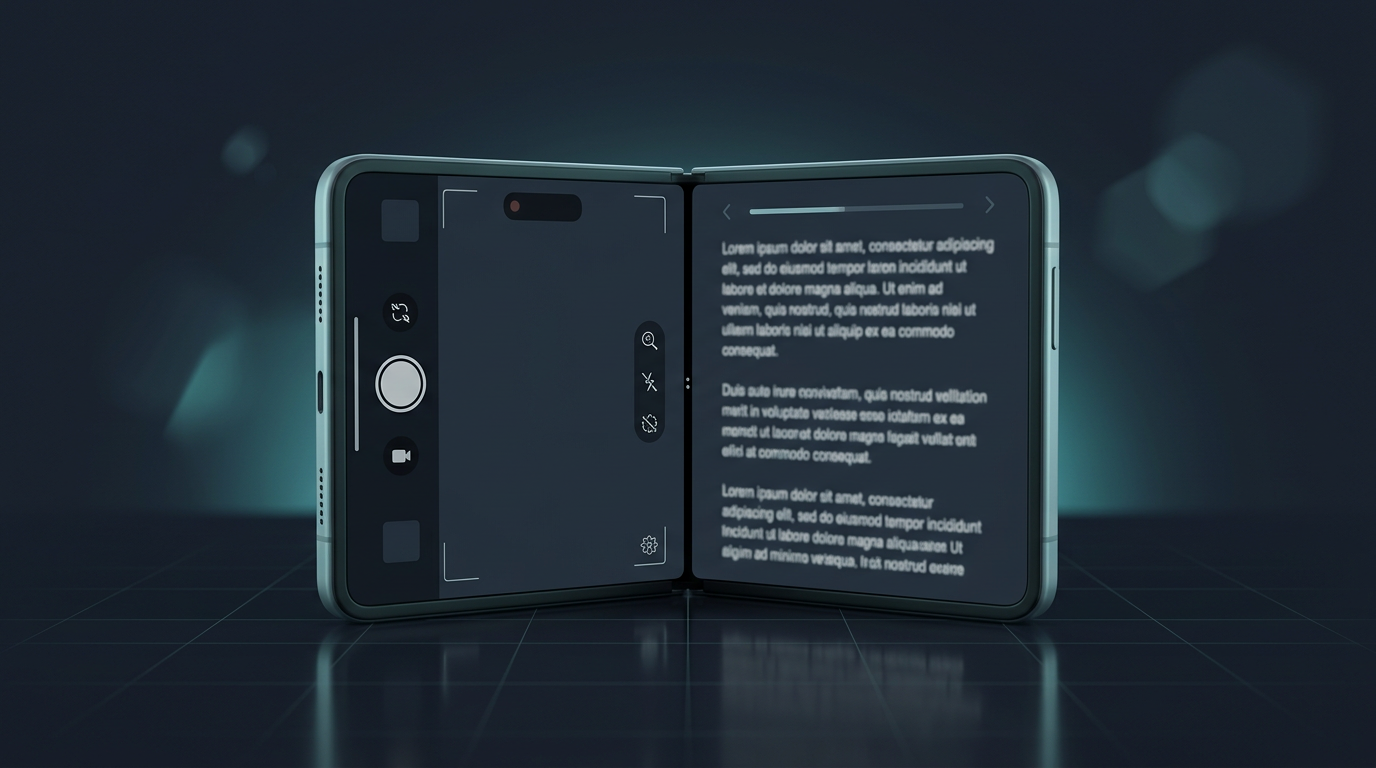
Most camera apps start with a familiar assumption: the phone is one flat rectangle. You hold it, prop it against something, or put it on a tripod. The interface may rotate, but the physical relationship between the camera, screen and creator barely changes.
iPhone Duo changes that assumption.
Apple's developer documentation now describes iPhone Duo as a two-display device joined by a hinge, with multiple poses and a need for interfaces that adapt as the device opens and closes. That immediately made me rethink a project I had been working on: DuoCreator, a creator-focused recording app that combines a real camera workflow with a teleprompter.
This series documents how I am building it.
The product idea
DuoCreator is not meant to be a generic camera replacement. The core idea is to make the physical form of iPhone Duo useful while recording.
In a compact configuration, the experience can behave like a conventional camera with the teleprompter layered over the preview. Open the device and there is enough room to separate the camera preview, script and controls. Place it in a partially open tabletop pose and the hinge itself becomes part of the workflow: the upper area can focus on framing and reading while the lower area becomes a control deck.
That is much more interesting than simply stretching an iPhone interface across a larger canvas.
The two concept images accompanying this series show the direction: one presents a wide, open studio with camera preview on one side and script on the other; the second explores a tabletop configuration with the recording surface above and controls below. They are product mockups, not photographs of shipping hardware.
Starting with a real architecture
The current app is written in SwiftUI. AVFoundation owns the capture pipeline, SwiftData stores lightweight project metadata, and video files remain ordinary movie files rather than being stored as database blobs.
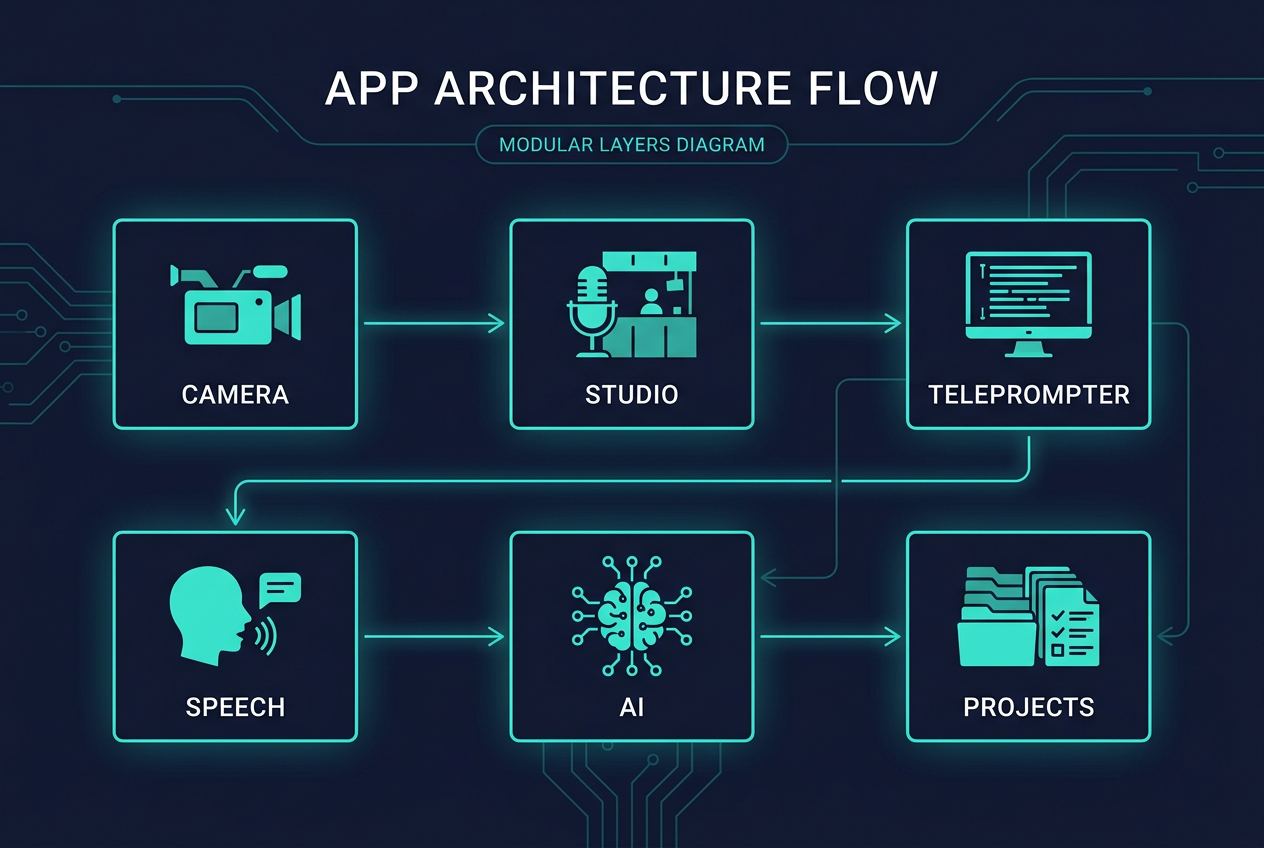
The project is split by feature:
- Camera and audio handle capture, preview and metering.
- Studio composes the recording interface.
- Teleprompter owns timing and reading behavior.
- Speech provides voice-following behavior.
- AI combines Apple's Foundation Models with image context.
- Projects and Takes manage recordings and review.
- Settings contains preferences, support and legal information.
One architectural rule has already paid off: the camera engine doesn't need to know whether the UI is compact, expanded or tabletop. It captures. SwiftUI decides how that capability is presented.
Treating the hinge as state, not decoration
Apple now exposes hinge information through SwiftUI. In DuoCreator I reduce that information to a small piece of UI state rather than allowing every screen to reason independently about the hardware.
A simplified version of the idea looks like this:
.onHingeChange { _, context in
    if let hinge = context.hinge,
       hinge.status == .partiallyOpen {
        hingeIsPartiallyOpen = true
        hingeAngle = hinge.angle
    }
}
The production implementation contains the rest of the policy, but the important point is the boundary: device state enters once, then the app maps it into a layout mode.
DuoCreator currently thinks in three modes: compact, expanded and tabletop.
That abstraction also makes the project easier to test. Instead of spreading conditions such as width, angle and orientation through dozens of views, I can test the policy that decides which studio composition should appear.
The hinge is not the only layout constraint
One of the details I found most interesting in Apple's new APIs is the idea of reserved regions. A foldable layout cannot pretend the physical division does not exist.
The Studio reads division regions from the geometry and uses them when deciding how much space belongs to each half. In tabletop mode, for example, the upper and lower surfaces are calculated around the division rather than placing important controls underneath it.
That sounds obvious after you see it. It is also exactly the kind of issue that a conventional responsive design can miss.
What I am deliberately not doing
I am not building a second version of every feature for Duo.
The camera engine is still a camera engine. A project is still a project. A take is still a take. The teleprompter still has one source of truth.
The form factor changes composition and interaction, not the meaning of the underlying features.
I also don't want beta hardware assumptions to leak everywhere. Apple marks several of these APIs as beta, so the implementation needs to tolerate change. The layout policy is intentionally small enough that it can evolve without rewriting the recording pipeline.
What comes next
The interesting part is that the hinge is only the beginning.
DuoCreator already has a real AVFoundation recording engine, capability-driven manual controls, a display-link teleprompter, speech-based Voice Follow, an outer-display teleprompter using Apple's camera scene accessory, and an on-device writing assistant built with Foundation Models.
Over the next parts I will break those pieces down one by one, including the mistakes and constraints that are easy to hide in a polished demo.
The goal of this series is not to publish the entire source code. It is to show enough real implementation to be useful to other iOS developers while keeping the product-specific pieces inside DuoCreator.
If Apple is introducing a new physical vocabulary for iPhone apps, I think the most interesting software will be the software that treats that vocabulary as part of the experience, not just as extra pixels.
Follow or support the development of DuoCreator
DuoCreator is an independent project currently in development. This series documents the real engineering work behind the app as it evolves toward release.
If you represent a company and would like to sponsor DuoCreator, collaborate on the project, explore an integration, provide hardware or services for testing, or discuss another form of partnership, contact us at hola@ayudantedigital.es.
We're especially interested in collaborations that genuinely add value for creators and the emerging iPhone Duo ecosystem.
Apple references
- Apple Developer — Get ready for iPhone Duo
- Apple Human Interface Guidelines — Designing for iPhone Duo
- Apple Developer — Xcode 27.1 Beta Release Notes
- Apple Developer — Xcode system requirements
- Apple Developer — DeviceHinge
- Apple Developer — CameraCaptureAccessory
- Apple Developer — Foundation Models / SystemLanguageModel
- Series: Building DuoCreator for iPhone Duo
- Project: AppsForDuo / DuoCreator
- Suggested canonical home: appsforduo.com
Spotted something to fix, or an app we should cover?
This article is independent research, cross-checked against Apple's developer documentation. If something's out of date, or you know an app that deserves a look, let us know — and if you're building for iPhone Duo yourself, we're happy to talk.
hola@ayudantedigital.es