Building DuoCreator — Part 7: On-Device Script Writing with Apple's Foundation Models
How Creator Assist turns Apple's on-device SystemLanguageModel into a narrow script-writing tool, and why the app still works when Apple Intelligence isn't available.
DuoCreator needs scripts, but I did not want "AI" to become a separate chatbot bolted onto the app.
The useful workflow is much narrower: "I have an idea for a video. Help me turn it into something natural I can actually say to camera."
Apple's Foundation Models framework gives the app access to the on-device system language model that powers Apple Intelligence, when it is available on the person's device.
A creator tool, not a blank chat box
The current CreatorAssistService works with product-specific inputs:
- project/video format
- tone
- target duration
- whether a strong opening hook is wanted
- the creator's idea
- verified context from selected images or transcription
Duration maps to approximate spoken-word targets. For example, a 60-second script targets roughly the amount of speech a creator could reasonably deliver in that window.
The model instructions emphasize natural spoken English, short readable paragraphs and bracketed non-spoken stage directions.
The output goes directly into the same script workflow used by the teleprompter.
Checking availability is part of the feature
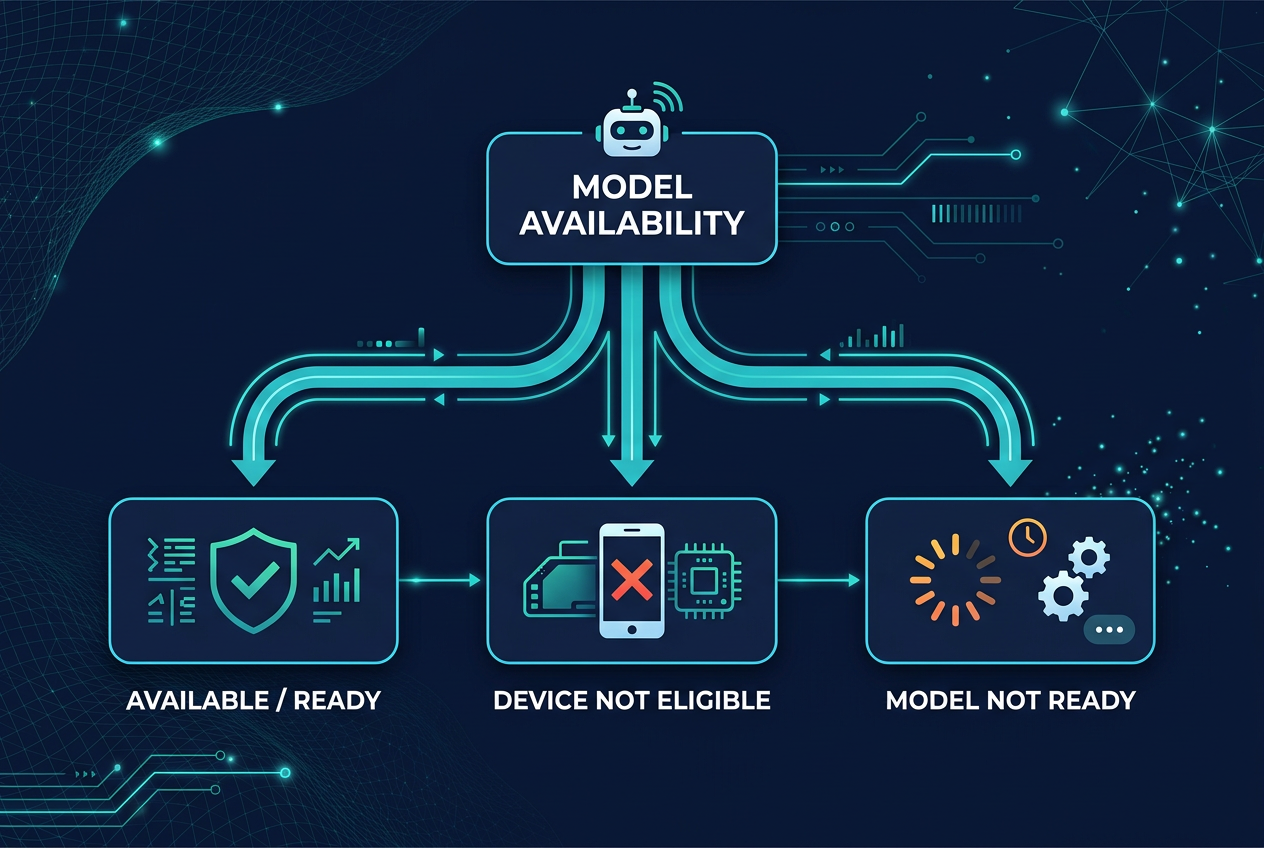
The service uses SystemLanguageModel.default, but it does not assume the model exists and is ready.
Apple exposes availability states, including cases where the device is not eligible or the model is not ready.
DuoCreator turns those into product behavior:
switch model.availability {
case .available:
    // Creator Assist can run
case .unavailable(.deviceNotEligible):
    // writing and pasting scripts still work
case .unavailable(.modelNotReady):
    // explain that the model isn't ready
default:
    // graceful fallback
}
The important line is not in the code: the app still works without AI.
Prompting for spoken language
A teleprompter script is different from an article.
Long paragraphs, corporate transitions and elaborate punctuation can make generated text look impressive while being unpleasant to say aloud.
The instructions therefore push the model toward spoken English and explicitly distinguish stage directions such as [SMILE], [SHOW PRODUCT] and [PAUSE].
Those markers are understood by the teleprompter parser and excluded from spoken-word estimates.
That is an example of an AI feature becoming useful because it understands the rest of the product's data model.
Transformations instead of endless prompting
Creator Assist also supports targeted transformations such as:
- shorter
- longer
- more casual
- more professional
- stronger hook
- better call to action
- simplify
- rewrite
The user does not need to learn prompt engineering just to tighten a script.
The service gives the model a constrained job and asks it to preserve factual claims.
iOS 27 means retesting prompts
Apple's Foundation Models documentation notes that the on-device model changes with OS releases, including iOS 27, and recommends testing prompts against new model versions.
That is easy to underestimate.
If model behavior is part of your app, a platform update can change output quality even when your own Swift code is unchanged.
For DuoCreator, prompt regression testing therefore belongs next to normal app testing. I want a small bank of representative creator requests and expected qualities: does it stay within the requested style, avoid inventing details, keep stage directions formatted, and produce something readable on a teleprompter?
Why I chose the on-device model first
The current technical decision is to use SystemLanguageModel for Creator Assist rather than making a network model mandatory.
That keeps the first implementation closely aligned with Apple's platform, reduces server infrastructure for this feature and provides a natural privacy story for eligible on-device use.
It also means accepting availability constraints instead of pretending every device can run the feature.
That tradeoff is fine because manual script writing remains first-class.
AI should shorten the distance to recording
The success metric for Creator Assist is not "how long did the user chat with the model?"
It is almost the opposite.
Idea → usable script → teleprompter → record.
If the feature works, the user should leave the AI screen quickly and enter the studio.
In the next part I will add visual context to that flow using Vision OCR and image classification, with an important rule: uncertain visual labels must never be silently turned into facts.
Follow or support the development of DuoCreator
DuoCreator is an independent project currently in development. This series documents the real engineering work behind the app as it evolves toward release.
If you represent a company and would like to sponsor DuoCreator, collaborate on the project, explore an integration, provide hardware or services for testing, or discuss another form of partnership, contact us at hola@ayudantedigital.es.
We're especially interested in collaborations that genuinely add value for creators and the emerging iPhone Duo ecosystem.
Apple references
- Apple Developer — Get ready for iPhone Duo
- Apple Human Interface Guidelines — Designing for iPhone Duo
- Apple Developer — Xcode 27.1 Beta Release Notes
- Apple Developer — Xcode system requirements
- Apple Developer — DeviceHinge
- Apple Developer — CameraCaptureAccessory
- Apple Developer — Foundation Models / SystemLanguageModel
- Series: Building DuoCreator for iPhone Duo
- Project: AppsForDuo / DuoCreator
- Suggested canonical home: appsforduo.com
Spotted something to fix, or an app we should cover?
This article is independent research, cross-checked against Apple's developer documentation. If something's out of date, or you know an app that deserves a look, let us know — and if you're building for iPhone Duo yourself, we're happy to talk.
hola@ayudantedigital.es